
Using a custom domain name with DotNest
On DotNest you can use your custom domain name with your site too instead of the default mysite.dotnest.net. Note that when it comes to new sites, custom domains are only available for Orchard Core sites. To use this feature you have to do the following:
- Buy a domain name at a domain registrar. We use and recommend Cloudflare, since it's an overall great company, but you can use any registrar.
- Configure the domain to use it with DotNest. For this, you need to use the admin panel your domain registrar provides you and configure domains the following way (make sure to wait up to a few hours for such changes to propagate through the domain name system if you don't see it working):
- Add a CNAME record that points the root of your domain (commonly you can use
@or the domain itself, likeexample.com), or a subdomain of your choice, tocustom-domain.dotnest.net(use exactly this text, "custom-domain" is not a placeholder for your domain). Note that not all domain registrars support using CNAME records without A records (this is also called CNAME flattening, ALIAS, or ANAME records). Please check with your registrar. As a scalable service, the IP address of your DotNest site can change at any time, so we don't support using A records. - Make sure to set the www subdomain (e.g. www.mydomain.com) as a CNAME to your second-level domain. Note that DotNest sites can only have www-less domains: a request to the www version will be redirected to the www-less one.
- If you do this at Cloudflare, you'll have two CNAME records like in the example below (the custom domain there is
mydotnestsite.com). Note that while we're using Cloudflare's proxying here to have some additional control over what goes to the site, as well as perks like visitor statistics, you don't always need this, nor are you required to use a similar service at another provider. Just a CNAME record is enough.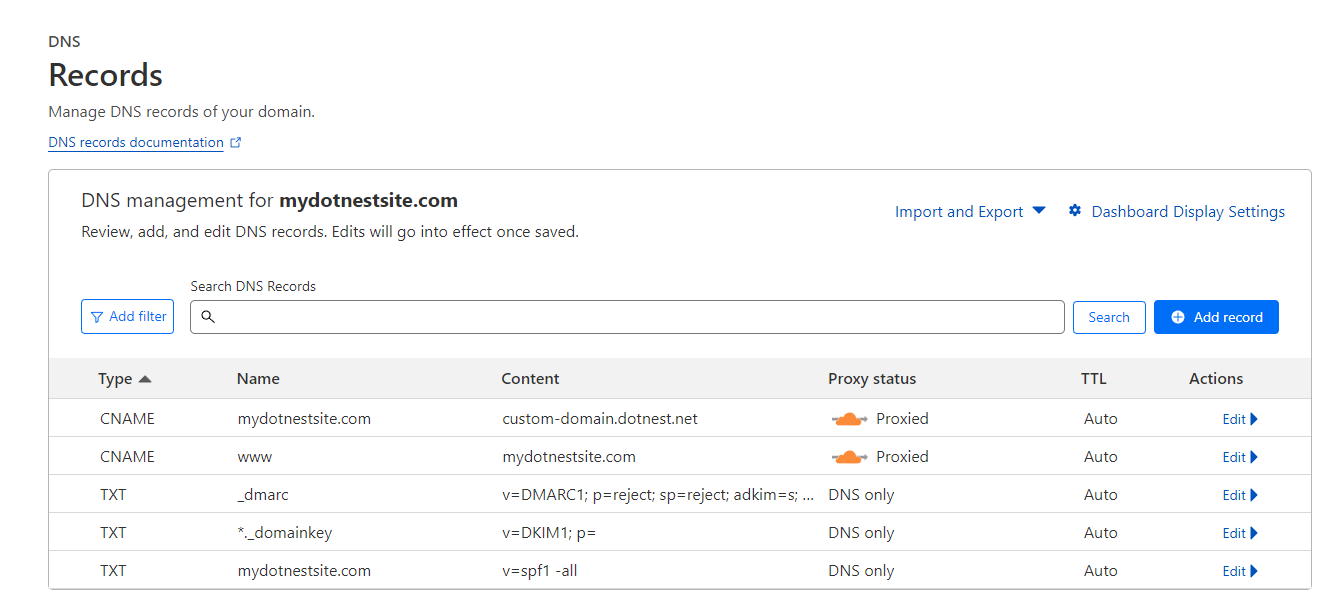
- Add a CNAME record that points the root of your domain (commonly you can use
- Get in touch with us to set up your site's custom domain. Note that custom domain usage is subject to a fee, see pricing details. However, if the site is for an open-source project of yours, we can provide you this service for free, just contact us!
Your site now should listen to your custom domain, enjoy! What's more, you may also remove the DotNest footer from your site, see details about theming.
Once you set up your custom domain any requests to the standard DotNest subdomain will be redirected to your custom domain (i.e. if users open your site with the old mysite.dotnest.com address then they will get redirected to mydomain.com).
If you do Media Theme theming for your site, then be sure to keep remote deployments pointing still to your site's standard dotnest.net domain. You may get "Remote deployment to ... failed with the HTTP code Forbidden..." errors due to Cloudflare's Bot Fight Mode otherwise.